# Intelligence Terminal
**Modrinth-app-inspired operator dashboard. 27 open sources. Docker-first. No telemetry.**
[](https://git.wilkensxl.de/MrSphay/intelligence-terminal)
[](https://git.wilkensxl.de/MrSphay/-/packages/container/intelligence-terminal/latest)
[](#quick-start)
[](LICENSE)
[-orange)](#architecture)
[](#data-sources-27)
[](#docker)
More screenshots
| Boot Sequence | World Map |
|:---:|:---:|
|  |  |
| 3D Globe View |
|:---:|
|  |
> **Supported deployment:** private home-server or lab deployment through Docker, Dockge, Pangolin, or local Node.js.
> Runtime data stays in your configured `runs/` volume and API keys are operator-owned.
> **Source:** [git.wilkensxl.de/MrSphay/intelligence-terminal](https://git.wilkensxl.de/MrSphay/intelligence-terminal)
> Pull the image or clone the repository to run Intelligence Terminal on your own infrastructure.
>
> **Design transparency:** the dashboard is inspired by app-style marketplace UX patterns, especially dark desktop app shells with a strong left navigation. It does not use Modrinth branding, logos, or assets and is not affiliated with Modrinth.
Intelligence Terminal pulls satellite fire detection, flight tracking, radiation monitoring, satellite constellation tracking, economic indicators, live market prices, conflict data, sanctions lists, and social sentiment from 27 open-source intelligence feeds in parallel, every 15 minutes, and renders everything in a dark, app-style operator workspace.
Hook it up to an LLM and it becomes a **two-way intelligence assistant**: pushing multi-tier alerts to Telegram and Discord when something meaningful changes, responding to commands like `/brief` and `/sweep` from your phone, and generating trade ideas grounded in real cross-domain data.
Run it locally with Node.js or pull the published Docker image for a home-server deployment.
No cloud. No telemetry. No subscriptions. Just `node server.mjs` and you're running.
## Token / Asset Warning
> [!WARNING]
> **Intelligence Terminal has not launched any official token, coin, NFT, airdrop, presale, or other blockchain-based asset.**
> Any token or digital asset using the Intelligence Terminal or Crucix name, logo, or branding is not affiliated with or endorsed by this project.
> Do not buy it, promote it, connect a wallet to claim it, sign transactions, or send funds based on third-party posts, DMs, or websites.
---
## Why This Exists
Most of the world's real-time intelligence — satellite imagery, radiation levels, conflict events, economic indicators, flight tracking, maritime activity — is publicly available. It's just scattered across dozens of government APIs, research institutions, and open data feeds that nobody has time to check individually.
Intelligence Terminal brings it all into one place. Not behind a paywall, not locked in an enterprise platform, not requiring a security clearance. Just open data, aggregated and cross-correlated on your own machine, updated every 15 minutes.
It was built for anyone who wants to understand what's actually happening in the world right now — researchers, journalists, traders, OSINT analysts, or just curious people who believe access to information shouldn't depend on your budget.
---
## Quick Start
```bash
# 1. Clone the repo
git clone https://git.wilkensxl.de/MrSphay/intelligence-terminal.git
cd intelligence-terminal
# 2. Install dependencies (just Express)
npm install
# 3. Copy env template and add your API keys (see below)
cp .env.example .env
# 4. Start the dashboard
npm run dev
```
> **If `npm run dev` fails silently** (exits with no output), run Node directly instead:
> ```bash
> node --trace-warnings server.mjs
> ```
> This bypasses npm's script runner, which can swallow errors on some systems (particularly PowerShell on Windows). You can also run `node diag.mjs` to diagnose the exact issue — it checks your Node version, tests each module import individually, and verifies port availability. See [Troubleshooting](#troubleshooting) for more.
The dashboard opens automatically at `http://localhost:3117` and immediately begins its first intelligence sweep. This initial sweep queries all 27 sources in parallel and typically takes 30–60 seconds — the dashboard will appear empty until the sweep completes and pushes the first data update. After that, it auto-refreshes every 15 minutes via SSE (Server-Sent Events). No manual page refresh needed.
**Requirements:** Node.js 22+ (uses native `fetch`, top-level `await`, ESM)
### Docker
```bash
docker pull git.wilkensxl.de/mrsphay/intelligence-terminal:latest
```
Dashboard at `http://localhost:3117`. Sweep data persists in `./runs/` via volume mount. The container disables browser auto-open by default, exposes `/api/health` and `/api/metrics`, and is suitable for Dockge/Pangolin.
#### Dockge / Pangolin Compose
```yaml
services:
intelligence-terminal:
image: git.wilkensxl.de/mrsphay/intelligence-terminal:latest
container_name: intelligence-terminal
env_file:
- path: .env
required: false
environment:
PORT: ${PORT:-3117}
AUTO_OPEN_BROWSER: "false"
ports:
- "${PORT:-3117}:${PORT:-3117}"
volumes:
- ./runs:/app/runs
restart: unless-stopped
healthcheck:
test: ["CMD", "node", "-e", "fetch('http://127.0.0.1:'+(process.env.PORT||3117)+'/api/health').then(r=>{if(![200,503].includes(r.status))process.exit(1);return r.json()}).then(j=>{if(j.status==='error')process.exit(1)}).catch(()=>process.exit(1))"]
interval: 60s
timeout: 10s
start_period: 45s
retries: 3
```
#### Required `.env` Example
```env
PORT=3117
REFRESH_INTERVAL_MINUTES=15
AUTO_OPEN_BROWSER=false
STALE_DATA_MAX_AGE_MINUTES=60
STALE_ALERT_COOLDOWN_MINUTES=60
DASHBOARD_URL=https://intelligence.example.internal
TERMINAL_ACTIONS_ENABLED=true
SWEEP_TOKEN=
SSE_HEARTBEAT_INTERVAL_MS=25000
TERMINAL_ACTION_RATE_LIMIT_WINDOW_MS=60000
TERMINAL_ACTION_RATE_LIMIT_MAX=10
BRIEF_VERBOSITY=standard
LLM_PROVIDER=openrouter
LLM_BASE_URL=https://openrouter.ai/api/v1
LLM_API_KEY=
LLM_MODEL=openrouter/free
LLM_TEMPERATURE=0.2
LLM_MAX_TOKENS=2000
LLM_TIMEOUT_MS=90000
OPENROUTER_SITE_URL=https://git.wilkensxl.de/MrSphay/intelligence-terminal
OPENROUTER_APP_NAME=Intelligence Terminal
FRED_API_KEY=
FIRMS_MAP_KEY=
EIA_API_KEY=
AISSTREAM_API_KEY=
ACLED_EMAIL=
ACLED_PASSWORD=
CLOUDFLARE_API_TOKEN=
BLS_API_KEY=
TELEGRAM_BOT_TOKEN=
TELEGRAM_CHAT_ID=
DISCORD_BOT_TOKEN=
DISCORD_CHANNEL_ID=
DISCORD_GUILD_ID=
DISCORD_WEBHOOK_URL=
```
Local LLM examples:
```env
# LM Studio
LLM_PROVIDER=lmstudio
LLM_BASE_URL=http://host.docker.internal:1234/v1
LLM_MODEL=local-model
# Ollama
LLM_PROVIDER=ollama
LLM_BASE_URL=http://host.docker.internal:11434
LLM_MODEL=llama3.1:8b
# Generic OpenAI-compatible endpoint
LLM_PROVIDER=openai-compatible
LLM_BASE_URL=http://host.docker.internal:8000/v1
LLM_API_KEY=
LLM_MODEL=your-model
```
For Pangolin or another reverse proxy, forward HTTP traffic to `intelligence-terminal:3117` (or the `PORT` you set). Missing API keys do not crash sweeps; affected sources are reported as degraded in `/api/health`.
#### Terminal Action Exposure
`POST /api/action` and `POST /api/sweep` can trigger operational actions such as manual sweeps. The dashboard has a **SET TOKEN** control that stores your `SWEEP_TOKEN` in browser local storage and sends it as the `x-crucix-token` header; do not put action tokens in URLs.
Recommended settings:
| Deployment | Settings |
| --- | --- |
| Private local machine | `NODE_ENV=development`, optional `SWEEP_TOKEN`, optional `TERMINAL_ACTIONS_ENABLED=true`. Localhost can run actions without a token for development. |
| Private LAN / Dockge | Set a strong `SWEEP_TOKEN`, keep `TERMINAL_ACTIONS_ENABLED=true`, expose only to trusted clients. |
| Pangolin-authenticated reverse proxy | Set a strong `SWEEP_TOKEN`, keep Pangolin auth in front, use the dashboard **SET TOKEN** flow once per browser. |
| Public internet | Do not expose Terminal Actions directly. If exposure is unavoidable, require `SWEEP_TOKEN`, keep proxy authentication enabled, lower `TERMINAL_ACTION_RATE_LIMIT_MAX`, and monitor server audit logs. |
Action endpoints reject cross-origin POST origins, apply a small in-memory per-IP rate limit, and write sanitized audit lines without logging the token.
When data remains stale past `STALE_DATA_MAX_AGE_MINUTES`, the server sends an operator alert through configured Telegram/Discord channels after failed or degraded sweep attempts. `STALE_ALERT_COOLDOWN_MINUTES` prevents repeated stale alerts from spamming every refresh interval. Set `DASHBOARD_URL` to the Pangolin/public URL you want included in those alerts.
#### Memory And Prediction Loop
Crucix stores longitudinal memory in `runs/intelligence.db` when the current Node.js build exposes `node:sqlite`. If SQLite is unavailable, the file is created as a harmless placeholder and `/api/health` reports the memory store as unavailable instead of failing the sweep.
The memory layer persists:
| Table | Purpose |
| --- | --- |
| `runs` | Sweep timestamps, source health counts, and delta direction summaries. |
| `entities` | Stable entity IDs for recurring countries, regions, and locations. |
| `events` | Stable event IDs for conflict, OSINT, urgent news, and new delta signals across sweeps. |
| `predictions` | Trade/intelligence hypotheses with evidence, confidence, horizon, outcome state, and latest grading. |
Query endpoints:
```text
GET /api/memory/search?q=iran&limit=25
GET /api/memory/predictions?state=open&limit=25
```
Memory endpoints use the same operator authorization gate as Terminal Actions. The dashboard Terminal Actions panel includes a `Memory` action for a quick operator-facing view of recent events and prediction states.
Retention, backup, and privacy expectations:
- Treat `runs/intelligence.db` as operator data. It can contain source excerpts, headlines, generated hypotheses, and URLs from your configured feeds.
- Back up `runs/` with the rest of your Dockge volume if you want longitudinal learning to survive container replacement.
- Delete `runs/intelligence.db` to reset SQLite memory; the next sweep recreates the schema.
- Do not commit `runs/` or `.env`. API credentials stay in `.env`; memory stores derived observations, not secrets.
- If you expose the dashboard through a reverse proxy, protect Terminal Actions and memory queries behind your normal authentication boundary.
#### Reverse Proxy SSE
The dashboard receives live sweep updates from `GET /events` using Server-Sent Events. The server sends `retry: 10000` reconnect guidance and lightweight heartbeat comments every `SSE_HEARTBEAT_INTERVAL_MS` milliseconds so reverse proxies do not close an otherwise idle stream between 15-minute sweeps.
Recommended proxy settings:
| Proxy | Setting |
| --- | --- |
| Pangolin / Traefik-style frontends | Keep response streaming enabled and set idle timeouts above `SSE_HEARTBEAT_INTERVAL_MS`. |
| Nginx | Disable proxy buffering for `/events`, keep `proxy_read_timeout` above the heartbeat interval, and preserve `Connection: keep-alive`. |
| Cloudflare-style proxies | Keep the heartbeat below common idle cutoffs; the default 25s is intentionally conservative. |
If you raise the heartbeat interval, keep it shorter than the lowest idle timeout in the proxy chain.
#### Scenario Watchlist
Intelligence Terminal can track operator hypotheses across sweeps with a runtime scenario file at `runs/scenarios.json`. On first run, the server creates three disabled starter examples:
- Middle East energy shock
- Macro stress spillover
- Regional escalation risk
Enable or add scenarios by editing `runs/scenarios.json`:
```json
{
"version": 1,
"scenarios": [
{
"id": "middle-east-energy-shock",
"enabled": true,
"name": "Middle East energy shock",
"description": "Energy supply risk building from regional conflict.",
"regions": ["Middle East", "Iran", "Strait of Hormuz"],
"categories": ["osint", "energy", "maritime"],
"keywords": ["missile", "strike", "hormuz", "oil"],
"thresholds": { "watching": 2, "building": 4, "confirmed": 7 },
"invalidation": "WTI normalizes and urgent regional signals fade."
}
]
}
```
Malformed scenario config degrades safely: sweeps continue and the dashboard shows the watchlist as a config issue. Scenario state is persisted in `runs/scenario-state.json`; delete that file to reset state transitions without deleting definitions.
Scenario states are `dormant`, `watching`, `building`, and `confirmed`. The dashboard shows active scenario state, confidence, score, and recent trigger time. Briefings include a `Scenario Watchlist` section when one or more scenarios change state.
#### Build And Publish Your Gitea Image
```bash
docker login git.wilkensxl.de -u MrSphay
docker build -t git.wilkensxl.de/mrsphay/intelligence-terminal:latest .
docker tag git.wilkensxl.de/mrsphay/intelligence-terminal:latest git.wilkensxl.de/mrsphay/intelligence-terminal:20260516
docker push git.wilkensxl.de/mrsphay/intelligence-terminal:latest
docker push git.wilkensxl.de/mrsphay/intelligence-terminal:20260516
```
Gitea Actions publishes the same image automatically when the repository secret `REGISTRY_TOKEN` is set with package read/write permissions. The workflow tags images as `latest`, the commit SHA, and a UTC `YYYYMMDD` release tag.
---
## What You Get
### Live Dashboard
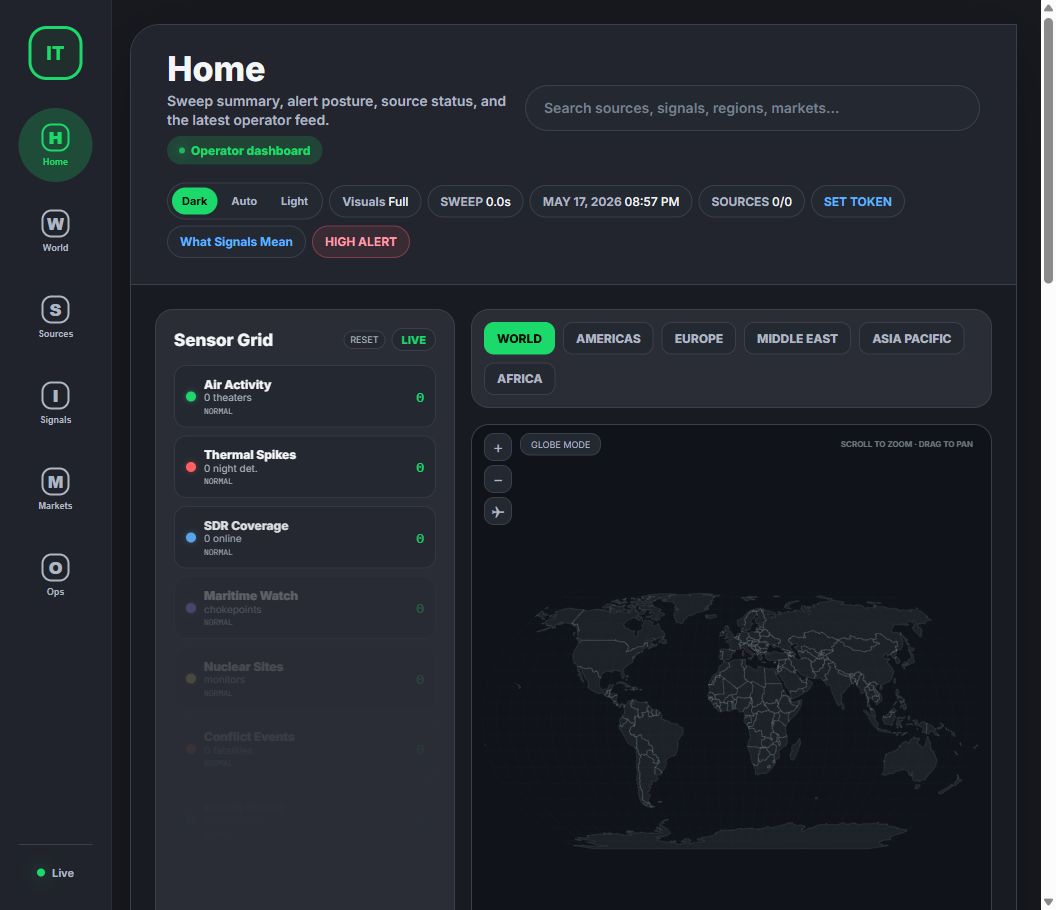
A self-contained app-style operator dashboard with dark mode by default, a large left navigation rail, rounded content surfaces, and view-specific panels:
- **Home** - sweep status, alert posture, latest feed, source count, macro summary, and high-level signal state
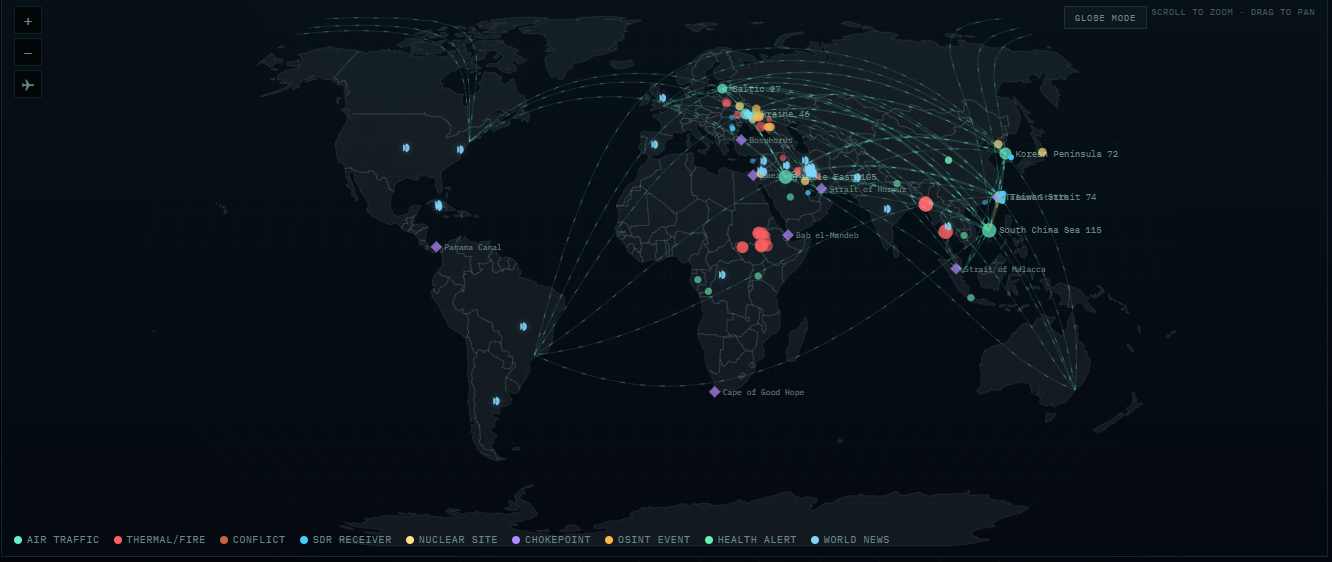
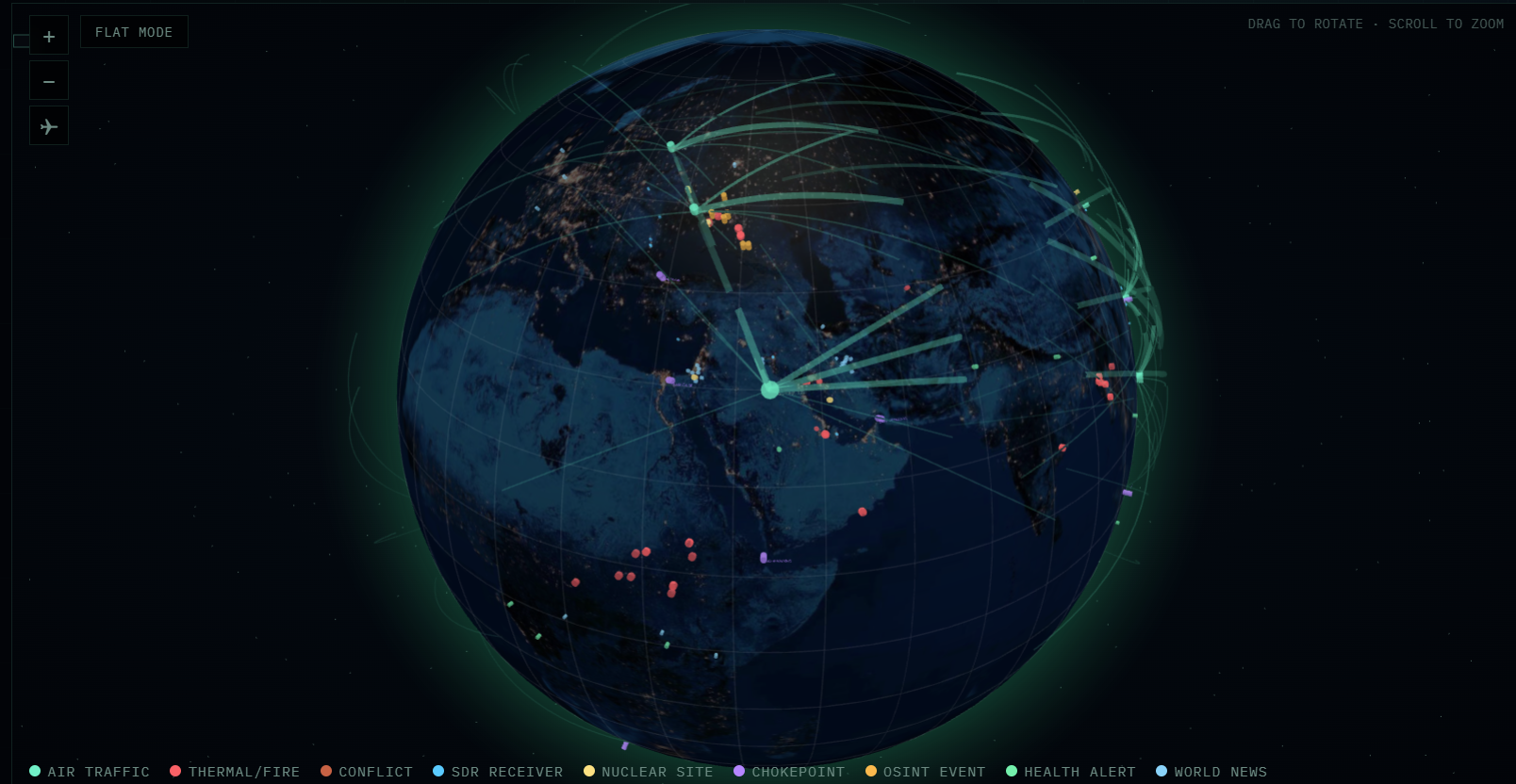
- **Worldview** - Globe.gl 3D globe or flat map, regional focus controls, 9 marker types, flight corridors, and layer focus/hide controls
- **Sources** - sensor grid, source health, API-key degradation signals, and transparent partial-data states
- **Signals** - cross-source signals, sweep delta, scenario watchlist, OSINT feed, and escalation/de-escalation context
- **Markets** - live indexes, crypto, energy, commodities, VIX, high-yield spread, supply-chain pressure, and LLM-assisted ideas
- **Ops** - browser-triggered terminal actions, performance mode, Telegram/Discord operator workflows, and system status
The UI keeps the existing operational features: `/api/data`, SSE live refresh, globe/flat map mode, layer focus/hide, terminal actions, low-performance mode, LLM output, Telegram and Discord alerting, and scenario watchlist data.
### Performance Modes
The `VISUALS FULL` / `VISUALS LITE` button in the top bar only changes rendering behavior - it does **not** remove data sources or reduce sweep coverage.
When you switch to **VISUALS LITE**, the dashboard:
- Disables decorative background effects such as radial and grid overlays
- Removes expensive blur/backdrop-filter effects on panels and overlays
- Stops non-essential animations like the logo ring blink, conflict rings, and corridor flow effects
- Disables globe auto-rotation and turns off animated flight-arc dashes
- Converts the horizontal news ticker and OSINT stream into static, scrollable lists instead of continuously animated marquees
Mobile-specific behavior:
- On mobile, `VISUALS LITE` also forces the dashboard into **flat map mode** if you are currently on the globe
- Future mobile loads will continue to start flat while low-perf mode is enabled
The preference is saved in browser local storage, so the UI will remember your last setting.
### Auto-Refresh
The server runs a sweep cycle every 15 minutes (configurable). Each cycle:
1. Queries all 27 sources in parallel (~30s)
2. Synthesizes raw data into dashboard format
3. Computes delta from previous run (what changed, escalated, de-escalated) — visible in the **Sweep Delta** panel on the dashboard
4. Generates LLM trade ideas (if configured)
5. Evaluates breaking news alerts — multi-tier (FLASH / PRIORITY / ROUTINE) with semantic dedup. Sends to Telegram and/or Discord if configured. Works with LLM evaluation or falls back to rule-based alerting when LLM is unavailable.
6. Pushes update to all connected browsers via SSE
### Telegram Bot (Two-Way)
Intelligence Terminal doubles as an interactive Telegram bot. Beyond sending alerts, it responds to commands directly from your chat:
| Command | What It Does |
|---------|-------------|
| `/status` | System health, last sweep time, source status, LLM status |
| `/sweep` | Trigger a manual sweep cycle |
| `/brief` | Compact text summary of the latest intelligence (direction, key metrics, top OSINT) |
| `/portfolio` | Portfolio status (if Alpaca connected) |
| `/alerts` | Recent alert history with tiers |
| `/mute` / `/mute 2h` | Silence alerts for 1h (or custom duration) |
| `/unmute` | Resume alerts |
| `/help` | Show all available commands |
This requires `TELEGRAM_BOT_TOKEN` and `TELEGRAM_CHAT_ID` in `.env`. The bot polls for messages every 5 seconds (configurable via `TELEGRAM_POLL_INTERVAL`).
### Discord Bot (Two-Way)
Intelligence Terminal also supports Discord as a full-featured bot with slash commands and rich embed alerts. It mirrors the Telegram bot's capabilities with Discord-native formatting.
| Command | What It Does |
|---------|-------------|
| `/status` | System health, last sweep time, source status, LLM status |
| `/sweep` | Trigger a manual sweep cycle |
| `/brief` | Compact text summary of the latest intelligence |
| `/portfolio` | Portfolio status (if Alpaca connected) |
Alerts are delivered as rich embeds with color-coded sidebars: red for FLASH, yellow for PRIORITY, blue for ROUTINE. Each embed includes signal details, confidence scores, and cross-domain correlations.
**Setup requires:** `DISCORD_BOT_TOKEN`, `DISCORD_CHANNEL_ID`, and optionally `DISCORD_GUILD_ID` for instant slash command registration. See [API Keys Setup](#api-keys-setup) for details.
**Webhook fallback:** If you don't want to run a full bot, set `DISCORD_WEBHOOK_URL` instead. This enables one-way alerts (no slash commands) with zero dependencies — no `discord.js` needed.
**Optional dependency:** The full bot requires `discord.js`. Install it with `npm install discord.js`. If it's not installed, Intelligence Terminal automatically falls back to webhook-only mode.
### Optional LLM Layer
Connect cloud or local OpenAI-compatible LLM providers for enhanced analysis:
- **AI trade ideas** — quantitative analyst producing 5-8 actionable ideas citing specific data
- **Smarter alert evaluation** — LLM classifies signals into FLASH/PRIORITY/ROUTINE tiers with cross-domain correlation and confidence scoring
- Providers: OpenRouter, OpenAI-compatible APIs, LM Studio, Ollama, OpenAI, Anthropic Claude, Google Gemini, OpenAI Codex, MiniMax, Mistral, Grok
- Graceful fallback — when LLM is unavailable, a rule-based engine takes over alert evaluation. LLM failures never crash the sweep cycle.
Primary env keys:
```env
LLM_PROVIDER=openrouter
LLM_BASE_URL=https://openrouter.ai/api/v1
LLM_API_KEY=
LLM_MODEL=openrouter/free
LLM_TEMPERATURE=0.2
LLM_MAX_TOKENS=2000
LLM_TIMEOUT_MS=90000
```
OpenRouter also supports model ids ending in `:free`; use the model id shown in your OpenRouter account when you want a specific free model.
---
## API Keys Setup
Copy `.env.example` to `.env` at the project root:
```bash
cp .env.example .env
```
### Required for Best Results (all free)
| Key | Source | How to Get |
|-----|--------|------------|
| `FRED_API_KEY` | Federal Reserve Economic Data | [fred.stlouisfed.org](https://fred.stlouisfed.org/docs/api/api_key.html) — instant, free |
| `FIRMS_MAP_KEY` | NASA FIRMS (satellite fire data) | [firms.modaps.eosdis.nasa.gov](https://firms.modaps.eosdis.nasa.gov/api/area/) — instant, free |
| `EIA_API_KEY` | US Energy Information Administration | [api.eia.gov](https://www.eia.gov/opendata/register.php) — instant, free |
These three unlock the most valuable economic and satellite data. Each takes about 60 seconds to register.
### Optional (enable additional sources)
| Key | Source | How to Get |
|-----|--------|------------|
| `ACLED_EMAIL` + `ACLED_PASSWORD` | Armed conflict event data | [acleddata.com/register](https://acleddata.com/register/) — free, OAuth2. `ACLED_USER` / `ACLED_USERNAME` are accepted as email aliases |
| `AISSTREAM_API_KEY` | Maritime AIS vessel tracking | [aisstream.io](https://aisstream.io/) — free |
| `ADSB_API_KEY` | Unfiltered flight tracking | [RapidAPI](https://rapidapi.com/adsbexchange/api/adsbexchange-com1) — ~$10/mo |
| `REDDIT_CLIENT_ID` + `REDDIT_CLIENT_SECRET` | Reddit social sentiment | [reddit.com/prefs/apps](https://www.reddit.com/prefs/apps/) — create a script app |
Reddit is OAuth-only in this fork. If the Reddit credentials are missing or rejected, the Reddit source is reported as degraded and no unauthenticated `reddit.com/.../hot.json` fallback is used.
### LLM Provider (optional, for AI-enhanced ideas)
Set `LLM_PROVIDER` to one of: `anthropic`, `openai`, `gemini`, `codex`, `openrouter`, `minimax`, `mistral`, `grok`
| Provider | Key Required | Default Model |
|----------|-------------|---------------|
| `anthropic` | `LLM_API_KEY` | claude-sonnet-4-6 |
| `openai` | `LLM_API_KEY` | gpt-5.4 |
| `gemini` | `LLM_API_KEY` | gemini-3.1-pro |
| `openrouter` | `LLM_API_KEY` | openrouter/auto |
| `codex` | None (uses `~/.codex/auth.json`) | gpt-5.3-codex |
| `minimax` | `LLM_API_KEY` | MiniMax-M2.5 |
| `mistral` | `LLM_API_KEY` | mistral-large-latest |
| `grok` | `LLM_API_KEY` | grok-4-latest |
For Codex, run `npx @openai/codex login` to authenticate via your ChatGPT subscription.
### Telegram Bot + Alerts (optional)
| Key | How to Get |
|-----|------------|
| `TELEGRAM_BOT_TOKEN` | Create via [@BotFather](https://t.me/BotFather) on Telegram |
| `TELEGRAM_CHAT_ID` | Get via [@userinfobot](https://t.me/userinfobot) |
| `TELEGRAM_CHANNELS` | *(Optional)* Comma-separated extra channel IDs to monitor beyond the 17 built-in channels |
| `TELEGRAM_POLL_INTERVAL` | *(Optional)* Bot command polling interval in ms (default: 5000) |
### Discord Bot + Alerts (optional)
| Key | How to Get |
|-----|------------|
| `DISCORD_BOT_TOKEN` | Create at [Discord Developer Portal](https://discord.com/developers/applications) → Bot → Token |
| `DISCORD_CHANNEL_ID` | Right-click channel in Discord (Developer Mode on) → Copy Channel ID |
| `DISCORD_GUILD_ID` | *(Optional)* Right-click server → Copy Server ID. Enables instant slash command registration (otherwise takes up to 1 hour for global commands) |
| `DISCORD_WEBHOOK_URL` | *(Optional)* Channel Settings → Integrations → Webhooks → New Webhook → Copy URL. Use this for alert-only mode without a bot |
**Discord bot setup:**
1. Go to [Discord Developer Portal](https://discord.com/developers/applications) and create a new application
2. Go to **Bot** → click **Reset Token** → copy the token to `DISCORD_BOT_TOKEN`
3. Under **Privileged Gateway Intents**, enable **Message Content Intent**
4. Go to **OAuth2** → **URL Generator** → select `bot` + `applications.commands` scopes → select `Send Messages` + `Embed Links` permissions
5. Copy the generated URL and open it in your browser to invite the bot to your server
6. Install the dependency: `npm install discord.js`
Alerts work with or without an LLM on both Telegram and Discord. With an LLM configured, signal evaluation is richer and more context-aware. Without one, a deterministic rule engine evaluates signals based on severity, cross-domain correlation, and signal counts.
### Without Any Keys
Intelligence Terminal still works with zero API keys. 18+ sources require no authentication at all. Sources that need keys return structured errors and the rest of the sweep continues normally.
---
## Architecture
```
intelligence-terminal/
├── server.mjs # Express dev server (SSE, auto-refresh, LLM, bot commands)
├── crucix.config.mjs # Configuration with env var overrides + delta thresholds
├── diag.mjs # Diagnostic script — run if server fails to start
├── .env.example # All documented env vars
├── package.json # Runtime: express | Optional: discord.js
├── docs/ # Screenshots for README
│
├── apis/
│ ├── briefing.mjs # Master orchestrator — runs all 27 sources in parallel
│ ├── save-briefing.mjs # CLI: save timestamped + latest.json
│ ├── BRIEFING_PROMPT.md # Intelligence synthesis protocol
│ ├── BRIEFING_TEMPLATE.md # Briefing output structure
│ ├── utils/
│ │ ├── fetch.mjs # safeFetch() — timeout, retries, abort, auto-JSON
│ │ └── env.mjs # .env loader (no dotenv dependency)
│ └── sources/ # 27 self-contained source modules
│ ├── gdelt.mjs # Each exports briefing() → structured data
│ ├── fred.mjs # Can run standalone: node apis/sources/fred.mjs
│ ├── space.mjs # CelesTrak satellite tracking
│ ├── yfinance.mjs # Yahoo Finance — free live market data
│ └── ... # 23 more
│
├── dashboard/
│ ├── inject.mjs # Data synthesis + standalone HTML injection
│ └── public/
│ └── jarvis.html # Self-contained app-style operator dashboard
│
├── lib/
│ ├── llm/ # LLM abstraction (8 providers, raw fetch, no SDKs)
│ │ ├── provider.mjs # Base class
│ │ ├── anthropic.mjs # Claude
│ │ ├── openai.mjs # GPT
│ │ ├── gemini.mjs # Gemini
│ │ ├── grok.mjs # Grok
│ │ ├── openrouter.mjs # OpenRouter (Unified API)
│ │ ├── codex.mjs # Codex (ChatGPT subscription)
│ │ ├── minimax.mjs # MiniMax (M2.5, 204K context)
│ │ ├── mistral.mjs # Mistral AI
│ │ ├── ideas.mjs # LLM-powered trade idea generation
│ │ └── index.mjs # Factory: createLLMProvider()
│ ├── delta/ # Change tracking between sweeps
│ │ ├── engine.mjs # Delta computation — semantic dedup, configurable thresholds, severity scoring
│ │ ├── memory.mjs # Hot memory (3 runs, atomic writes) + cold storage (daily archives)
│ │ └── index.mjs # Re-exports
│ └── alerts/
│ ├── telegram.mjs # Multi-tier alerts (FLASH/PRIORITY/ROUTINE) + two-way bot commands
│ └── discord.mjs # Discord bot (slash commands, rich embeds) + webhook fallback
│
└── runs/ # Runtime data (gitignored)
├── latest.json # Most recent sweep output
└── memory/ # Delta memory (hot.json + cold/YYYY-MM-DD.json)
```
### Design Principles
- **Pure ESM** — every file is `.mjs` with explicit imports
- **Minimal dependencies** — Express is the only runtime dependency. `discord.js` is optional (for Discord bot). LLM providers use raw `fetch()`, no SDKs.
- **Parallel execution** — `Promise.allSettled()` fires all 27 sources simultaneously
- **Graceful degradation** — missing keys produce errors, not crashes. LLM failures don't kill sweeps.
- **Each source is standalone** — run `node apis/sources/gdelt.mjs` to test any source independently
- **Self-contained dashboard** — the HTML file works with or without the server
---
## Data Sources (27)
### Tier 1: Core OSINT & Geopolitical (11)
| Source | What It Tracks | Auth |
|--------|---------------|------|
| **GDELT** | Global news events, conflict mapping (100+ languages) | None |
| **OpenSky** | Real-time ADS-B flight tracking across 6 hotspot regions | None |
| **NASA FIRMS** | Satellite fire/thermal anomaly detection (3hr latency) | Free key |
| **Maritime/AIS** | Vessel tracking, dark ships, sanctions evasion | Free key |
| **Safecast** | Citizen-science radiation monitoring near 6 nuclear sites | None |
| **ACLED** | Armed conflict events: battles, explosions, protests | Free (OAuth2) |
| **ReliefWeb** | UN humanitarian crisis tracking | None |
| **WHO** | Disease outbreaks and health emergencies | None |
| **OFAC** | US Treasury sanctions (SDN list) | None |
| **OpenSanctions** | Aggregated global sanctions (30+ sources) | Partial |
| **ADS-B Exchange** | Unfiltered flight tracking including military | Paid |
### Tier 2: Economic & Financial (7)
| Source | What It Tracks | Auth |
|--------|---------------|------|
| **FRED** | 22 key indicators: yield curve, CPI, VIX, fed funds, M2 | Free key |
| **US Treasury** | National debt, yields, fiscal data | None |
| **BLS** | CPI, unemployment, nonfarm payrolls, PPI | None |
| **EIA** | WTI/Brent crude, natural gas, inventories | Free key |
| **GSCPI** | NY Fed Global Supply Chain Pressure Index | None |
| **USAspending** | Federal spending and defense contracts | None |
| **UN Comtrade** | Strategic commodity trade flows between major powers | None |
### Tier 3: Weather, Environment, Tech, Social, SIGINT (7)
| Source | What It Tracks | Auth |
|--------|---------------|------|
| **NOAA/NWS** | Active US weather alerts | None |
| **EPA RadNet** | US government radiation monitoring | None |
| **USPTO Patents** | Patent filings in 7 strategic tech areas | None |
| **Bluesky** | Social sentiment on geopolitical/market topics | None |
| **Reddit** | Social sentiment from key subreddits | OAuth |
| **Telegram** | 17 curated OSINT/conflict/finance channels (web scraping, expandable via config) | None |
| **KiwiSDR** | Global HF radio receiver network (~600 receivers) | None |
### Tier 4: Space & Satellites (1)
| Source | What It Tracks | Auth |
|--------|---------------|------|
| **CelesTrak** | Satellite launches, ISS tracking, military constellations, Starlink/OneWeb counts | None |
### Tier 5: Live Market Data (1)
| Source | What It Tracks | Auth |
|--------|---------------|------|
| **Yahoo Finance** | Real-time prices: SPY, QQQ, BTC, Gold, WTI, VIX + 9 more | None |
---
## npm Scripts
| Script | Command | Description |
|--------|---------|-------------|
| `npm run dev` | `node --trace-warnings server.mjs` | Start dashboard with auto-refresh |
| `npm run sweep` | `node apis/briefing.mjs` | Run a single sweep, output JSON to stdout |
| `npm run inject` | `node dashboard/inject.mjs` | Inject latest data into static HTML |
| `npm run brief:save` | `node apis/save-briefing.mjs` | Run sweep + save timestamped JSON |
| `npm run diag` | `node diag.mjs` | Run diagnostics (Node version, imports, port check) |
---
## Configuration
All settings are in `.env` with sensible defaults:
| Variable | Default | Description |
|----------|---------|-------------|
| `PORT` | `3117` | Dashboard server port |
| `REFRESH_INTERVAL_MINUTES` | `15` | Auto-refresh interval |
| `STALE_DATA_MAX_AGE_MINUTES` | `60` | Data age threshold for stale health state |
| `STALE_ALERT_COOLDOWN_MINUTES` | `60` | Minimum time between repeated operator stale-data alerts |
| `DASHBOARD_URL` | local URL | Dashboard URL included in operator alerts |
| `LLM_PROVIDER` | disabled | `anthropic`, `openai`, `gemini`, `codex`, `openrouter`, `minimax`, `mistral`, or `grok` |
| `LLM_API_KEY` | — | API key (not needed for codex) |
| `LLM_MODEL` | per-provider default | Override model selection |
| `TELEGRAM_BOT_TOKEN` | disabled | For Telegram alerts + bot commands |
| `TELEGRAM_CHAT_ID` | — | Your Telegram chat ID |
| `TELEGRAM_CHANNELS` | — | Extra channel IDs to monitor (comma-separated) |
| `TELEGRAM_POLL_INTERVAL` | `5000` | Bot command polling interval (ms) |
| `DISCORD_BOT_TOKEN` | disabled | For Discord alerts + slash commands |
| `DISCORD_CHANNEL_ID` | — | Discord channel for alerts |
| `DISCORD_GUILD_ID` | — | Server ID (instant slash command registration) |
| `DISCORD_WEBHOOK_URL` | — | Webhook URL (alert-only fallback, no bot needed) |
Delta engine thresholds (how sensitive the system is to changes between sweeps) can be customized in `crucix.config.mjs` under the `delta.thresholds` section. The defaults are tuned to filter out noise while catching meaningful moves.
---
## API Endpoints
When running `npm run dev`:
| Endpoint | Description |
|----------|-------------|
| `GET /` | App-style operator dashboard |
| `GET /api/data` | Current synthesized intelligence data (JSON) |
| `GET /api/health` | Server status, uptime, source count, LLM status |
| `GET /events` | SSE stream for live push updates |
---
## Troubleshooting
### `npm run dev` exits silently (no output, no error)
This is a known issue where npm's script runner can swallow errors, particularly on Windows PowerShell. Try these in order:
**1. Run Node directly (bypasses npm):**
```bash
node --trace-warnings server.mjs
```
This is functionally identical to `npm run dev` but gives you full error output.
**2. Run the diagnostic script:**
```bash
node diag.mjs
```
This tests every import one by one, checks your Node.js version, and verifies port 3117 is available. It will tell you exactly what's failing.
**3. Check if port 3117 is already in use:**
A previous Intelligence Terminal instance may still be running in the background.
```powershell
# Windows PowerShell
netstat -ano | findstr 3117
taskkill /F /PID
# Or kill all Node processes
taskkill /F /IM node.exe
```
```bash
# macOS / Linux
lsof -ti:3117 | xargs kill
```
Then try starting again. You can also change the port by setting `PORT=3118` in your `.env` file.
**4. Check Node.js version:**
```bash
node --version
```
Intelligence Terminal requires Node.js 22 or later. If you have an older version, download the latest LTS from [nodejs.org](https://nodejs.org/).
### Dashboard shows empty panels after first start
This is normal — the first sweep takes 30–60 seconds to query all 27 sources. The dashboard will populate automatically once the sweep completes. Check the terminal for sweep progress logs.
### Some sources show errors
Expected behavior. Sources that require API keys will return structured errors if the key isn't set. The rest of the sweep continues normally. Check the Source Integrity section in the dashboard (or the server logs) to see which sources failed and why. The 3 most impactful free keys to add are `FRED_API_KEY`, `FIRMS_MAP_KEY`, and `EIA_API_KEY`.
OpenSky can also return `HTTP 429` when its public hotspots are queried too aggressively. Intelligence Terminal does not try to evade that limit. Instead, it surfaces the throttle/error in source health and preserves the most recent non-empty air traffic snapshot from `runs/` so the dashboard flight layer does not suddenly go blank on a throttled sweep.
### Telegram bot not responding to commands
Make sure both `TELEGRAM_BOT_TOKEN` and `TELEGRAM_CHAT_ID` are set in `.env`. The bot only responds to messages from the configured chat ID (security measure). You should see Telegram alert and bot polling startup lines in the server logs. If not, double-check your token with `curl https://api.telegram.org/bot/getMe`.
### Discord bot not responding to slash commands
Check these in order:
1. Make sure `DISCORD_BOT_TOKEN` and `DISCORD_CHANNEL_ID` are set in `.env`
2. Verify `discord.js` is installed: `npm ls discord.js`. If missing, run `npm install discord.js`
3. If slash commands don't appear, set `DISCORD_GUILD_ID` — without it, global commands can take up to 1 hour to propagate. Guild-specific commands register instantly
4. Confirm the bot was invited with `bot` + `applications.commands` scopes and has `Send Messages` + `Embed Links` permissions in the target channel
5. Check server logs for `[Discord] Bot logged in as ...` on startup. If you see `[Discord] discord.js not installed`, install it and restart
6. **Webhook-only fallback:** If you just want alerts without slash commands, set `DISCORD_WEBHOOK_URL` instead of the bot token. No `discord.js` needed.
---
## Screenshots
The `docs/` folder contains dashboard screenshots referenced by this README. The hero screenshot has been refreshed for the app-style shell; regenerate the supporting map/globe images from a running instance when those views materially change.
| File | Description |
|------|-------------|
| `docs/dashboard.png` | Full operator dashboard - hero image at the top of this README |
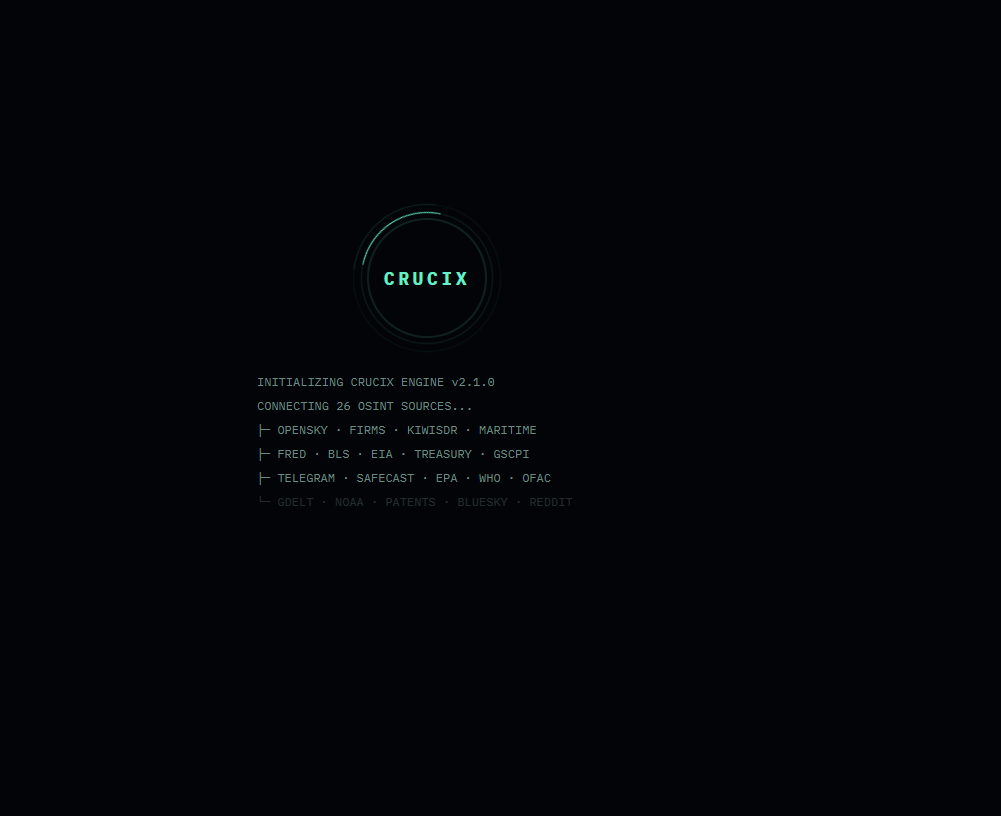
| `docs/boot.png` | Boot sequence animation |
| `docs/map.png` | Worldview map with marker types and flight arcs |
| `docs/globe.png` | 3D WebGL globe view with atmosphere glow and markers |
For a fresh capture, run the dashboard, wait for a sweep to complete, then use your browser's DevTools (`F12` -> `Ctrl+Shift+P` -> "Capture full size screenshot") or a tool like [LICEcap](https://www.cockos.com/licecap/) for GIFs.
---
## Contributing
Found a bug? Want to add a 28th source? PRs welcome. Each source is a standalone module in `apis/sources/` - just export a `briefing()` function that returns structured data and add it to the orchestrator in `apis/briefing.mjs`.
If you find this useful, a star on the Gitea repository helps other operators find it too.
For contribution guidelines, review expectations, and source-add rules, see `CONTRIBUTING.md`. For security reports, see `SECURITY.md`.
## Contact
For bugs, feature requests, and integration ideas, use the Gitea issue tracker so discussion stays visible and actionable:
https://git.wilkensxl.de/MrSphay/intelligence-terminal/issues
## Upstream And License
Intelligence Terminal is an AGPL-3.0-only Crucix fork focused on Docker-first home-server operation, source health transparency, Gitea Registry delivery, and operator-owned deployments. Upstream project credit remains with the original Crucix project.
---
## License
AGPL-3.0